Function
The Profile Management page allows you to implement stateless computing for compute nodes. Stateless computing means that operating systems (OSs) or upper-layer applications have no correlation with the status of basic input/output systems (BIOSs), network interface cards (NICs), and universally unique identifiers (UUIDs) on compute nodes and that server hardware migration and replacement do not require any modification to the OSs or upper-layer applications.
Table 1 describes the buttons on the Profile Management page, and Table 2 describes the parameters on this page.
Button |
Description |
|---|---|
New Profile |
Sets Profile Name, Profile Type, and Associated Slot. A maximum of 128 profiles can be created. Sets Server BIOS Configuration, NIC BIOS Configuration, and Uniqueness Configuration. |
Import Profile |
Imports a profile from a compute node in the chassis or the local computer to the system. NOTE:
When both the master and slave chassis are installed, the profile can be imported from only the detected slot where the master chassis is installed. |
Migrate Profile |
Migrates a profile from a compute node in the specified or independent chassis to another compute node in other specified or independent chassis. |
When both the master and slave chassis are installed, you can only query items on the profile for the slave chassis.
Parameter |
Description |
|---|---|
Profile Name |
Identifies a profile. |
Profile Type |
Indicates the profile type.
The supported compute nodes include the CH121, CH121 V3, CH121L V3, CH121H V3, CH140, CH140 V3, CH140L V3, CH220, CH220 V3, CH221, CH222, CH222 V3, CH225 V3, CH226 V3, CH240, CH242, CH242 V3, and CH242 V3 DDR4. Only iMana 200 V5.26 or later supports the profile management function. |
Associated chassis |
NOTE:
This parameter exists only when both the master chassis and slave chassis are installed. It indicates the specified chassis with which the profile is associated. |
Associated Slot |
Indicates the slot numbers of the compute nodes to which a profile is associated.
|
Status |
Indicates the delivery status of a profile.
|
Operation |
Perform operations on a profile.
NOTE:
Within two minutes after editing a profile, do not perform a restart or active/standby switchover of the MM910 management modules.
NOTE:
This operation can be performed only when both the master chassis and slave chassis are installed.
NOTE:
The system automatically delivers a profile to a compute node after you remove and then reinstall the compute node, power off and then power on the compute node, or gracefully restart the compute node. NOTE:
If only |


Creating a Profile
- On the Profile Management page, click New Profile.
The New Profile dialog box is displayed.
- Set Profile Name and Profile Type.
 NOTE:
NOTE: The value of Profile Name contains a maximum of 20 characters, including letters, digits, and underscores (_), but cannot start with an underscore.
- Click OK.
The profile configuration page is displayed.
- Set the parameters. For parameter description, see Table 3. NOTE:
- Before configuring BIOS parameters, determine the parameters supported by each compute node based on the MM910 Management Module V100R001 User Guide. You can configure each supported parameter as follows:
- Select the parameter and specify a value.
- Ignore the parameter and use the existing value.
- The BIOS can support the stateless computing function only in legacy mode. If you select the UEFI mode, the stateless computing function is unavailable.
Table 3 Parameters for creating a profile Parameter
Description
Server BIOS Configuration
View server BIOS configuration by clicking one of the following:
- Show all: displays all BIOS configuration parameters.
- V5 (Purley): displays configuration parameters and default values for V5 compute nodes.
- Others: displays configuration parameters and default values for V1 and V3 compute nodes.
BIOS configuration includes the following:
- Boot
- Advance Processor
- Memory
- Virtual
- System
- Security
NOTE:When setting the server BIOS parameters, you are advised to set the Advance Processor and System parameters to the default values.
NIC BIOS Configuration
Configures the NICs on compute nodes.
- MAC Address Pool: Click
 . In the displayed Select MAC Address Pool dialog box, select the MAC address pools to be associated with a common profile of stateless computing.
 - NIC Slot
- Slot Status: Specifies whether to enable the NIC BIOS profile. The value is On or Off. On indicates that the NIC BIOS profile is enabled, and Off indicates that the NIC BIOS profile is disabled and that the default NIC BIOS configuration is used.
- NIC Type: The value is MZ510, MZ512, MZ520, MZ522, MZ730, MZ910, MZ912 or MZ221.
- Multi-channel Status: specifies whether to enable the multi-channel function. This parameter is available only if the value of NIC Type is MZ510, MZ512, MZ520 and MZ522. The multi-channel function allows a physical network port on a NIC to be divided into multiple virtual ports.
- : modifies NIC configuration, including the following parameters:NOTE:
- For the CH140 and CH140 V3, the working mode configuration of the MZ512 and MZ520 takes effect only for port0 and port1.
- For the server nodes based on the Purley platform, for example CH121 V5, when the Boot Type is set to UEFI in Server BIOS Configuration, the parameters VlanMode, PVID, PVIDpriority and VlanTrunkRange are available for MZ520 and MZ522.
- Global PF type: specifies the working mode of an MZ510 or MZ512 NIC. The value is NIC, FCoE, or iSCSI. NIC indicates that all physical functions (PFs) are configured as NIC channels to transmit Ethernet service data. FCoE indicates that PF 1 is configured as a Fibre Channel over Ethernet (FCoE) channel to transmit FCoE service data, and other PFs are configured as NIC channels. iSCSI indicates that PF 1 is configured as an Internet Small Computer Systems Interface (iSCSI) channel to transmit iSCSI service data, and other PFs are configured as NIC channels.
- PXE Boot Enable: specifies whether to enable a network port to boot from the Preboot Execution Environment (PXE).
- PXE Vlan: If you select Enable, you can manually set PXE Vlan ID. If you select Disable, the value of PXE Vlan ID is the default virtual local area network (VLAN) ID of the switch module.
- PXE Vlan ID: identifies the VLAN that data packets transmitted over PXE pass through. For the MZ520 and MZ522, the value ranges from 0 to 4094. For other NICs, the value ranges from 2 to 4094. The value 0 indicates that the PXE VLAN mode is disabled.
- PXE Vlan Priority: specifies the priority of data packets in the switch module. A large value indicates a high priority.
- PF Type: indicates the working mode of a PF.
- MAC: Select MAC addresses from the list. If this parameter is left blank, the default value is used.
- Min Bandwidth (%): The sum of the values of Min Bandwidth (%) of four PFs must be 100%.
- Max Bandwidth (%): specifies the maximum bandwidth percentage of a PF when the other PFs are idle. The value for each PF ranges from 0% to 100%, and 0% indicates that the PF is disabled.
- PF Vlan ID: identifies the VLAN for a PF of the NIC type. The value is an integer ranging from 2 to 4094. You do not need to set the VLAN ID for a PF of the FCoE or iSCSI type.
- MAC Address Auto Assignment: Enable indicates that MAC addresses in a MAC address pool are automatically assigned to NIC ports.
- SR-IOV: specifies whether to enable the single-root I/O virtualization (SR-IOV) function. This parameter is available only if the multi-channel function is disabled for an MZ510, MZ512, MZ520, and MZ522 NIC. The SR-IOV function allows an NIC to be shared by multiple VMs.
- WWNN: identifies a NIC chip. If this parameter is left blank, the default value is used.
- WWPN: identifies a PF. If this parameter is left blank, the default value is used.
- SAN Properties
- SAN Boot Enable: specifies whether to enable SAN boot.
- Destination WWPN: specifies the destination storage controller WWPN.
- Destination LUN ID: specifies the destination LUN ID.
- Priority: specifies the boot option sequence. The priority is in descending order from top to bottom. The SAN boots with the destination WWPN and LUN ID with the top priority.
- VlanMode: The value can be NORMAL, FILTERING, or QINQ depending on the chip settings.
NOTE:- If VlanMode is NORMAL, the parameters PVID, PVIDpriority, and VlanTrunkRange will be unavailable.
- If VlanMode is FILTERING, the parameters PVID, PVIDpriority, and VlanTrunkRange are available. The parameter PVID is optional.
- If VlanMode is QINQ, the parameters PVID and PVIDpriority are available and VlanTrunkRange is unavailable. PVID is mandatory, and the PVIDs of a port cannot be the same.
- PVID: specifies the default VLAN ID of the port. The value range is 1 to 4094 for the QINQ mode and 0 to 4094 for the FILTERING mode. The vaue 0 indicates that PVID is not set. .
- PVIDpriority: specifies the priority of the PVID. The value range is 0 to 7.
- VlanTrunkRange: specifies the VLAN ID list. The total number of VLAN IDs of a chip cannot exceed 256. The value range of the VLAN ID is 1 to 4094. Enter the VLAN IDs in ascending order. The value of VlanTrunkRange can contain positive integers and integer segment separated by commas, for example, 1, 2, 3-5, 8.NOTE:
The value 1, 2, 3-5, 8 indicates VLANs 1, 2, 3, 4, 5, and 8.
LOM Configuration
- Slot Status: On indicates enabling parameter configuration of the LOM. Off indicates disabling parameter configuration of the LOM and the LOM adopts the default configuration.
 : modifies the LOM configuration, including the following parameters:
- LOM Status: specifies whether to enable ports of the LOM.
- MAC address configuration: The LOM MAC configuration is supported only when Boot Type is UEFI.
NOTE:Only the CH121 V5 and CH242 V5 support stateless computing configuration of LOMs.
Uniqueness Configuration
Specifies the unique information about a compute node, for example, UUID.
- UUID Resource Pool Name: UUID resource pool associated with a stateless computing profile.
- : allows you to select an associated UUID resource pool.
- UUID Resource Pool Name: UUID resource pools that can be associated with stateless computing profiles.
- UUID Prefix: Prefix of UUIDs in a resource pool.
- Number of UUIDs: Quantity of UUIDs in a resource pool.
Importing a Profile
- On the Profile Management page, click Import Profile.
The Import Profile dialog box is displayed.
- Select Import from board or Import from PC, and set the other parameters. For details, see Table 4.
Table 4 Methods for importing a profile Method
Procedure
Import from board
Import a profile from a compute node in the chassis.
- Select the slot number of a compute node from the Source slot drop-down list.
- Enter the new profile name in the Profile Name text box.
- Set Profile Type to Common profile or Custom profile.
- Click OK.
Import from PC
Import a profile from the local PC.
- Click Browse and import a profile from the local PC.
The file name of the profile to be imported, including the file name extension, can contain a maximum of 37 characters.
- Click OK.
Migrating a Profile
- On the Profile Management page, click Migrate Profile.
The Migrate Profile dialog box is displayed.
- Select the source compute node slot from the Source slot drop-down list, and select the destination compute node slot from the Destination slot drop-down list.
- Click OK.
When both the master and slave chassis are installed, choose the chassis and compute node slot specified in the profile.
Delivering a Profile
- Determine the page type.
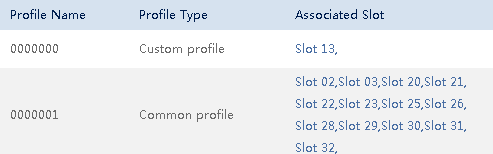
- In the profile list, click a slot number in the Associated Slot column. See Figure 1.
NOTE:
If no slot is associated with a profile, the value of Associated Slot for this profile is None.
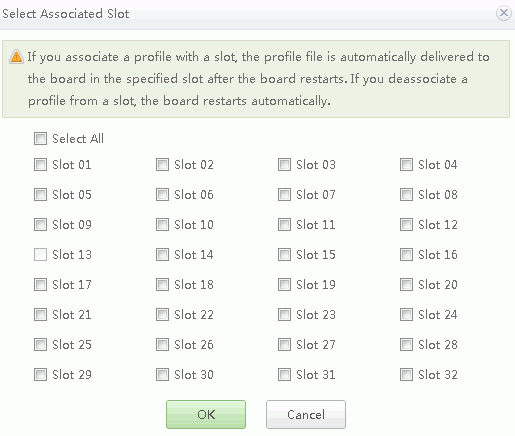
The Select Associated Slot dialog box is displayed, as shown in Figure 2.
- Select the slot number to be associated with the profile, and click OK.
The selected slot number is displayed in the Associated Slot column.
NOTE: The compute node in the selected slot and the compute node to which the policy imported must be of the same type.
- Click
 in the Operation column.
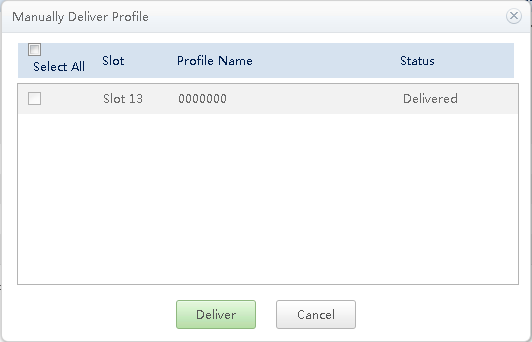
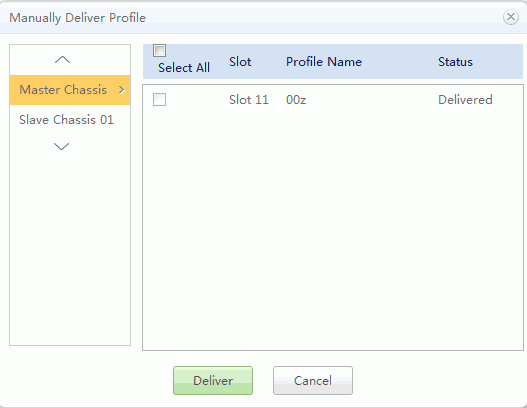
The Manually Deliver Profile dialog box is displayed, as shown in Figure 3.
- Select a slot number and click Deliver to apply the profile to the compute node in the specified slot.
- Click
 in the Operation column.
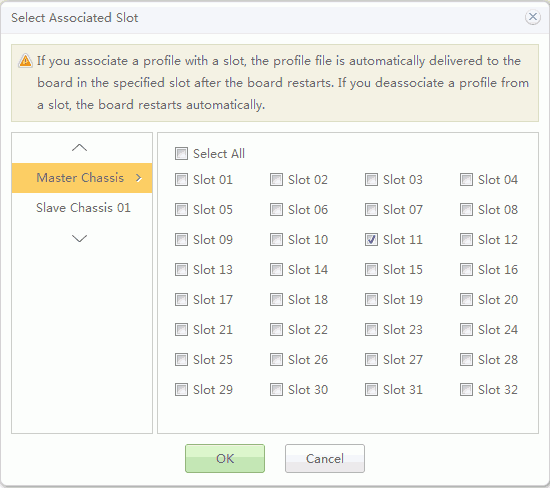
The Select Associated Slot column is displayed, as shown in Figure 4.
- Select the chassis and compute node slot number to be associated with the profile, and click OK.
The selected chassis and compute node slot number is displayed in the Associated chassis and Associated Slot column.
NOTE: - For the chassis not associated with the profile, Associated chassis lists None.
- The compute node in the selected slot and the compute node to which the policy imported must be of the same type.
- Click
 in the Operation column.
The Manually Deliver Profile dialog box is displayed, as shown in Figure 5.
- Select a chassis and compute node slot number and click Deliver to apply the profile to the compute node in the specified slot. NOTE:
Within two minutes after delivering a profile, do not perform a restart or active/standby switchover of the MM910 management modules.