Function
On the Fan Status page, you can view the status and speed of each fan (fans 1 to 14).
For details about the physical locations of components, see the labels on the chassis emulation panel on the Chassis Information page. Figure 1 shows an example.
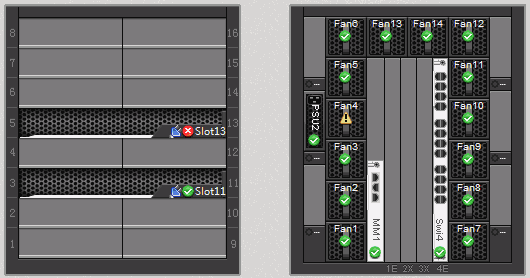
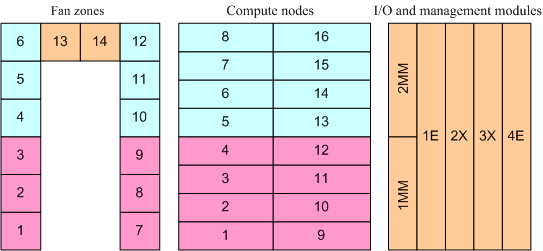
Figure 2 shows the fan speed zones, which are distinguished by colors.
- Fan modules 1, 2, 3, 7, 8, and 9 form a zone and dissipate heat for compute nodes in slots 1, 2, 3, 4, 9, 10, 11, 12.
- Fan modules 4, 5, 6, 10, 11, and 12 form a zone and dissipate heat for compute nodes in slots 5, 6, 7, 8, 13, 14, 15, and 16.
- Fan modules 13 and 14 form a zone and dissipate heat for modules in slots 1MM, 2MM, 1E, 2X, 3X, and 4E.
Fan modules in the same zone run at the same speed. The fan speeds in the three zones are automatically adjusted so that their differences do not exceed 25%.
Sudden changes in the fan module speeds may be caused by the following:
- Certain fan modules in the zone are abnormal.
- The management modules fail to obtain the air inlet sensor temperature.
- The fan modules fail to communicate with the management modules.
- The corresponding boards of the fan modules have temperature alarms.
- The corresponding boards of the fan modules have components with high temperatures.