- In the profile list, click a slot number in the Associated Slot column. See Figure 1.
 NOTE:
NOTE: If no slot is associated with a profile, the value of Associated Slot for this profile is None.
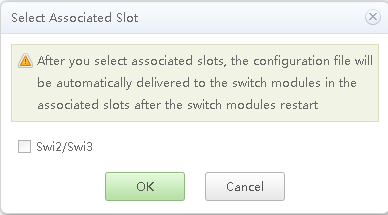
The Select Associated Slot dialog box is displayed, as shown in Figure 2.
NOTE: - Swi1 corresponds to the switch module in slot 1E.
- Swi2 corresponds to the switch module in slot 2X.
- Swi3 corresponds to the switch module in slot 3X.
- Swi4 corresponds to the switch module in slot 4E.
- Select the slot number to be associated with the profile, and click OK.
The selected slot number is displayed in the Associated Slot column.
- Click
 in the Operation column.
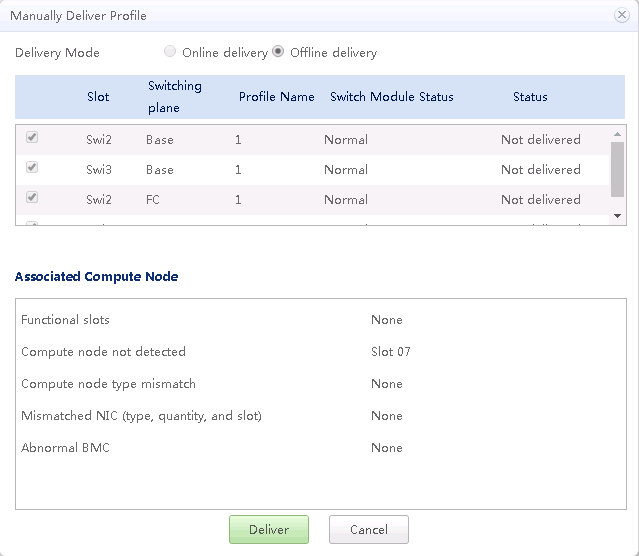
The Manually Deliver Profile dialog box is displayed, as shown in Figure 3.
Table 1 describes the parameters.
Table 1 Parameter descriptions Item
Description
Delivery Mode
- Offline delivery: Offline delivery to an Ethernet switching plane restarts the plane. Offline delivery to an FC switching plane overwrites the existing FC configurations.
- Online delivery: Online delivery to an Ethernet switching plane does not restart the plane. Offline delivery to an FC switching plane does not overwrite the existing FC configurations.
NOTE:The first delivery of new configurations must be offline.
Current Configuration
Shows the current configuration of the management module.
NOTE:This operation is supported only when the profile has been modified.
Associated Compute Node
Shows compute node errors, including Compute node type mismatch, Mismatched NIC (type, quantity, and slot), and Abnormal BMC.
Table 2 lists the online delivery issues and solutions.
Table 2 Online delivery issues and solutions Online Delivery Issue
Solution
Incorrect slot for online delivery.
Close and re-open the delivery policy page.
Failed to run the online delivery command.
Try online delivery again. If the delivery still fails, contact technical support.
The SOL channel is in use.
Manually free up the SOL channel.
The password is empty.
Enter the password for logging in to the switch module through the serial port as prompted.
Incorrect login password.
Re-enter the password for logging in to the switch module through the serial port as prompted.
The switching system is busy.
- Try online delivery again after some time. If the problem persists, go to step 2.
- Log in to the command line interface (CLI) of the switching system through the serial port and check the switching system status. Based on the switching system status, choose to end the current operation or wait for it to finish. Log out of the switching system.
The Associated Compute Nodes area displays the status of compute nodes.
Compute nodes are abnormal if their types do not match, their NIC types, quantity, or slots do not match, or their BMCs are abnormal.
- Select a slot number and click Deliver to issue the profile to the switch module in the specified slot.

 NOTE:
NOTE: Within two minutes after delivering a profile, do not perform a restart or active/standby switchover of the MM910 management modules.